Sales logs lead in a CRM. Finance tracks accounts in spreadsheets. Operations updates inventory in another tool, or WMS. After years of advising Australian mid-market firms, we’ve seen how these disconnected systems create hidden costs. Manual data entry causes errors, reports conflict, and decisions are delayed.
Our audits show duplicate entries alone can skew forecasts by up to 15%. Inconsistent reporting undermines confidence, and slow decisions reduce competitiveness. These inefficiencies drain resources that could drive growth.
As much as we expect our clients to use Odoo at its full capacity without integrations, complex organisations sometimes need integrations to slowly adopt the Odoo without removing all their 3rd party system.
ERP integration solves this by linking disparate systems into a unified ecosystem. Data flows automatically, updates happen in real time, and teams operate from a single source of truth.
This guide explains ERP integration, the approaches that suit different business needs, and practical steps Australian organisations can take to implement it successfully.
What Is ERP Integration?
ERP integration connects your Enterprise Resource Planning system with other business applications, enabling seamless data flow across your organisation. Many businesses run ERP software but still rely on manual data transfers, spreadsheets, or batch uploads. True integration removes these touchpoints, synchronising data automatically and in real time.
Integrated systems reduce errors, accelerate processes, and provide consistent, current information for all teams. For Australian businesses, this means sales see real-time inventory, finance gets up-to-date transaction data for BAS reporting, and operations track orders without manual cross-checks.
Creating a Single Source of Truth
In our work with Australian SMEs, we find that a “Single Source of Truth” isn’t just a technical goal; it’s a risk management strategy. When systems integrate properly, updates in one application automatically reflect across connected platforms, ensuring everyone works from identical, current information.
The Cost of Disconnection (What We See in the Field):
- Inventory Lag: Sales quotes customers based on “available” stock that was actually sold on eBay two hours ago.
- Compliance Friction: Finance teams are manually adjusting GST entries because the e-commerce tool didn’t sync the correct tax brackets for international vs. domestic shipping.
The Integrated Advantage:
- Audit-Ready Financials: Automated data flow ensures that BAS and GST reporting pulls directly from verified transaction records, not a dozen mismatched spreadsheets.
- Reliable Payroll: We ensure that payroll data used for superannuation calculations matches employee records in real time, preventing the common “Super Guarantee” underpayment errors that trigger ATO audits.
- Decision making: Having dashboards for all the departments from the bottom to the top of the company is key to ensure relevant decision making.
How ERP Integration Works
True ERP integration goes beyond simple connectivity; it creates a unified ecosystem where data flows automatically. Instead of relying on manual entry, which introduces errors and delays, your systems communicate directly through secure protocols.
For example, when a customer places an order on your e-commerce site, a properly integrated system triggers multiple actions: inventory levels update in real time, digital invoices are generated, and fulfilment teams receive picking instructions instantly. No re-keying, no delays, and full transparency for finance and operations.
The Mechanics of Seamless Data Flow
- Automated API Exchange: Systems transmit data instantly via protocols like REST or SOAP, with no manual intervention.
- Dynamic Syncing: Critical stock levels can update in real time, while high-volume reporting can use scheduled batching.
- Bidirectional Integrity: Changes in the CRM or ERP are mirrored in both systems, ensuring consistency.
- Format Transformation: Data is automatically converted and cleaned to match the receiving system’s structure.
Compliance & Local Reliability
For Australian businesses, ERP integration also supports compliance. Payroll and ERP integration ensures superannuation, Fair Work record-keeping, and other statutory calculations are handled automatically, reducing errors and keeping you audit-ready.
ERP Integration Methods
Different integration approaches suit different business contexts. Selecting the right model requires balancing technical capability, long-term scalability, compliance obligations, and total cost of ownership, not just upfront implementation expense.
Point-to-Point Integration
Point-to-point integration creates direct connections between two systems, for example, linking an ERP to a CRM to synchronise customer and order data.
This approach works when:
- Connecting a small number of systems (2–4 applications)
- Integration logic is straightforward
- Budget constraints limit infrastructure investment
- Internal IT can manage custom code
The hidden cost appears over time. Although point-to-point integration seems affordable initially, every system upgrade requires connections to be reviewed and often reworked. As more systems are added, the number of connections grows rapidly, increasing maintenance effort, downtime risk, and architectural fragility.
This approach may suit early-stage environments, but does not scale well long-term.
Custom API Integration
Custom API integration uses application programming interfaces to build tailored connections between systems. APIs provide structured methods for data exchange, while custom development aligns integration logic to operational workflows.
This approach enables organisations to:
- Design workflows aligned to internal processes
- Handle complex data transformation rules
- Apply business-specific validation logic
- Maintain architectural control
One frequent challenge in API integration is data mapping conflict, for example, when a “Customer Name” field is formatted differently across systems. Without transformation layers, these mismatches can cause sync failures or data corruption. Robust integration includes automated transformation and validation layers to prevent these issues.
Custom API integration suits Australian businesses with industry-specific compliance requirements, such as linking project costing systems with payroll and taxation reporting.
The trade-off: higher upfront investment and ongoing dependency on skilled developers.
Middleware / Enterprise Service Bus (ESB)
An ESB introduces a centralised integration hub. Instead of systems connecting directly to one another, each connects to the hub, which manages routing, orchestration, and data transformation.
This model reduces architectural fragility. If a CRM is replaced later, only the connection to the hub needs to be reconfigured, rather than every system in the environment. This decoupled structure improves scalability and long-term flexibility.
In cloud-driven environments, platforms such as Odoo provide native integration capabilities that operate effectively within a hub-style architecture. Australian businesses often partner with certified Odoo experts to implement these solutions and standardise data exchange.
Benefits include:
- Centralised monitoring and logging
- Reduced connection sprawl
- Standardised data protocols
- Managed message handling for reliability
- Easier troubleshooting
ESB suits organisations with:
- Multiple on-premises systems
- Complex integration landscapes
- Established internal IT governance
iPaaS (Integration Platform as a Service)
iPaaS delivers cloud-based integration through managed platforms with pre-built connectors and orchestration tools. It reduces infrastructure overhead and simplifies hybrid integration between SaaS and on-premises systems.
Advantages include:
- Pre-built connectors for ERP, CRM, payroll, and e-commerce
- Built-in monitoring and error handling
- Automatic platform updates
- Scalable infrastructure
- Reduced internal IT burden
For Australian businesses, integration increasingly intersects with regulatory compliance. Automated data exchange between ERP and payroll systems supports Single Touch Payroll (STP) Phase 2 reporting to the ATO. Proper integration reduces manual error and ensures reporting aligns with statutory obligations.
What Systems Should You Connect?
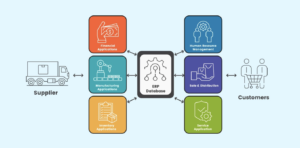
Strategic ERP integration is essential for delivering a significant business impact. However, it’s not without its challenges. Here’s what to connect and how to tackle common hurdles for Australian businesses:
CRM (Customer Relationship Management)
Sync sales leads, customer contact details, purchase history, and billing information. Integration ensures sales and finance teams work from the same customer data.
Many businesses struggle with data duplication when integrating CRMs such as Salesforce or HubSpot with their ERP systems. Without proper mapping, duplicate customer records can create confusion between sales and finance teams, causing billing errors.
E-commerce
Automate online order processing and inventory synchronisation. Australian businesses often integrate platforms like Shopify Plus, WooCommerce, and BigCommerce to reduce manual order entry and avoid overselling.
Businesses often overlook tax mapping. For example, if your Shopify tax settings don’t align perfectly with your ERP’s GST codes, your BAS reporting can turn into a manual correction nightmare.
In a recent project, we connected BigCommerce with NetSuite for an Australian retailer. By configuring ‘Available-to-Promise’ logic, we prevented overselling inventory stored in Melbourne to customers in Brisbane, reducing customer complaints and refunds.
HRMS / HR Systems
Connect payroll, employee records, recruitment, and leave management. Australian integration must ensure compliance with Fair Work, including automated pay slip generation. Pay slips must include employer and employee details, pay period, gross and net pay, superannuation contributions, and fund details; all easily managed with the right integrations.
Incorrectly automating award rates within ERP and HR systems has led some businesses to underpay staff, risking fines from the Fair Work Ombudsman.
For a Sydney-based logistics company, we integrated Xero Payroll with their ERP. This ensured compliance with Fair Work requirements and automated award rate updates, saving 8 hours weekly on manual adjustments.
Finance / Accounting
Link bank feeds, invoicing, and payment processing. Integration supports Australian tax obligations, including Business Activity Statements (BAS). Processes such as GST, PAYG, and fringe benefits tax (FBT) reporting benefit directly from automated data collection across integrated systems.
A mismatch in bank feed reconciliation rules can distort GST reporting. We’ve seen businesses underreport GST due to duplicate entries in their ERP’s general ledger.
For organisations running Odoo for operations while retaining Xero for financial reporting, the decision to integrate or consolidate systems requires careful evaluation of tax mapping, reconciliation workflows, and long-term scalability.
BI & Analytics
Connect dashboards and reporting tools to pull live data for KPI tracking and business intelligence. Integration eliminates manual report generation and ensures decision-makers have access to current information.
For an Australian wholesaler, we integrated PowerBI with their ERP. This uncovered a 12% margin leak in their regional shipping routes, a problem their standard ERP reports had missed for years.
Project Management
Sync cost tracking, timelines, and resource allocation. Integration provides visibility into project profitability and helps avoid scheduling conflicts.
Many businesses struggle to gain visibility into resource allocation when integrating tools like Asana or Jira into their ERP systems, leading to overbooked teams and missed deadlines.
Inventory / Warehouse / Manufacturing
Integrate stock management, production planning, and work orders. Real-time inventory visibility prevents stockouts and improves order fulfilment.
Australian businesses with multiple warehouses often struggle with inventory synchronisation. For example, failing to factor in shipping delays between Perth and Sydney can lead to overcommitted orders.
In a project for a manufacturing company, we integrated Microsoft Dynamics 365 with their warehouse systems. This allowed real-time stock visibility across their Brisbane and Adelaide locations, improving order fulfilment accuracy by 20%.
By addressing these hurdles and focusing on specifics such as tax laws, compliance requirements, and region-specific platforms, your ERP integration can go beyond functionality and truly add value to your business.
Common ERP Integration Risks and How to Manage Them
Even when the right systems are selected, integration can fail without proper governance. The most common risks occur at a structural level rather than within any single platform.
Data Governance Failures
Poor master data management causes errors to cascade across CRM, finance, payroll, and inventory systems. Integration requires clear ownership of customer, supplier, product, and employee records before systems are connected.
Security and Privacy Exposure
Integration introduces new data pathways. Access permissions, audit logging, and encryption controls must be reviewed to ensure compliance with the Australian Privacy Act.
Cost Escalation and Technical Debt
Integration is not a one-time expense. Ongoing API changes, system upgrades, and evolving business requirements require continuous investment. Businesses that underestimate long-term support costs often experience integration breakdowns within 2–3 years.
Change Management Breakdown
Integrated systems alter workflows. Without structured training, stakeholder communication, and phased rollout, user resistance can undermine integration ROI.
Maintenance and Lifecycle Management
ERP environments evolve. Software updates, tax regulation changes, and compliance requirements (BAS, PAYG, FBT, Fair Work updates) require integration monitoring and periodic review.
How to Start Your Integration Journey
Successful Australian ERP integrations follow a phased approach to manage risk and ensure ROI.
- Audit Your ‘Data Debt’: Before connecting systems, cleanse your master records. In our experience, ABN and GST validation errors in legacy CRMs are the #1 cause of failed Finance integrations.
- Prioritise by Compliance Risk: Start with high-impact connections like Payroll/HR (Fair Work) or Finance (BAS/GST). These deliver immediate value by reducing legal and tax exposure.
- Establish ‘Data Ownership’: Assign a ‘Data Champion’ in each department (Sales, Finance, Ops). Integration fails when no one is responsible for the quality of the information flowing between systems.
- Build a Maintenance Budget: Integration is a living system. Factor in a 15-20% annual buffer for API updates and legislative changes (like new ATO reporting requirements).
Where Integration Becomes Competitive Advantage
ERP integration is no longer a nice-to-have IT project; it is the baseline for scaling your business in a high-compliance environment. As we’ve explored, the shift from manual Export-to-CSV workflows to automated synchronisation isn’t just about saving time; it’s about de-risking your operations.
Whether it’s ensuring Fair Work compliance during a payroll sync or preventing GST leakage between your e-commerce store and general ledger, the most successful integrations prioritise accuracy and governance over simple connectivity.
The Strategic Question for Your Business:
You don’t need to integrate everything at once. The key is identifying which data island is currently costing you the most in manual labour or compliance risk. By starting with high-impact connections like Finance or HR, you build a foundation for a truly data-driven enterprise.
Ready to audit your current systems? Speak with our integration specialists to identify where your biggest data leaks are hiding.