
As businesses scale, manual processes often lead to delays, inconsistencies, and increased workload across tasks like record updates, team coordination, and transaction follow-ups.
Automation helps maintain efficiency and control by reducing repetitive manual work.
Odoo automation rules allow workflows to run in the background, connecting different functions without manual input.
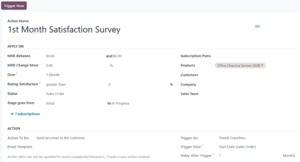
Automation rules in Odoo are logic-based workflows that automatically execute actions when defined triggers and conditions are met.
Rather than asking users to manually update every step, Odoo can respond in real time to changes in records, statuses, dates, approvals, or thresholds.
For example, when a quotation is confirmed, Odoo can automatically:
Because Odoo operates in a connected environment, actions in one module can affect another without needing duplicate data entry.
Odoo automation rules are evaluated in a structured flow. When an event occurs, the system checks the trigger, validates conditions, and then executes defined actions only if all criteria are met.
Every automation rule in Odoo is built around four main elements:
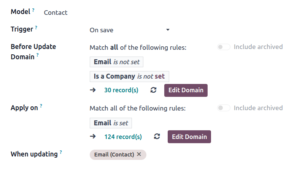
Defines the business object where the automation is applied, such as Contacts, Sales Orders, Invoices, or Inventory items. This determines which data the rule will act on.
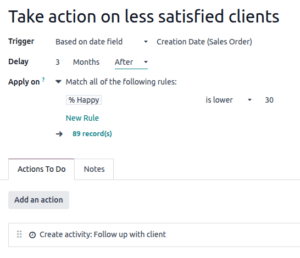
The event that initiates the workflow. Common triggers include:
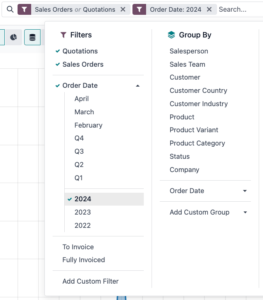
Conditions determine whether a record qualifies for automation.
Odoo evaluates conditions to ensure only relevant records trigger actions, such as:
This filtering prevents unnecessary or incorrect automation execution.
Actions are the tasks executed when both the trigger and conditions are satisfied. These may include:
When an automation event occurs, Odoo processes it in the following order:
For time-based triggers, execution depends on scheduled system checks, meaning actions only run when the defined timing condition is reached.
Key takeaway
Odoo automation does not run immediately on every event. It only executes when triggers, conditions, and timing rules align, ensuring efficient and controlled workflow automation.
Once a rule is triggered and conditions are met, Odoo executes the assigned actions. The main action types include:
When setting up actions, always group them logically and order them correctly. Take advantage of AI-assisted updates to dynamically populate fields based on contextual data.
Sales teams often lose time managing leads and follow-ups manually. Automation helps assign leads based on territory or expertise, trigger follow-up reminders for aging quotations, and update deal stages automatically based on customer activity. This keeps pipelines active and reduces missed opportunities.
Manual financial processes increase the risk of errors and delays. Automation supports recurring invoice generation, streamlines vendor bill capture using OCR, and simplifies bank reconciliation. This improves accuracy and reduces time spent on routine accounting tasks.
Stock shortages and delayed production often come from poor visibility. Automation enables real-time reorder rules, triggers purchase orders when inventory drops, and generates work orders based on confirmed sales demand.
This keeps operations aligned and prevents disruptions. For a deeper look at how automation supports production workflows in manufacturing, see how Odoo automation is applied in real-world operations.
HR teams often manage repetitive administrative tasks across hiring and employee lifecycle. Automation can trigger onboarding workflows when candidates are hired, manage leave approvals with notifications, and send reminders for contract renewals or performance reviews. This ensures consistency and reduces manual coordination.
Building an automation rule in Odoo is straightforward. Follow these steps:
Always use proper naming conventions and document the purpose of the rule in the Notes tab. It is crucial to test your rules in a safe staging environment before pushing them live to ensure they behave exactly as expected.
To make automation rules easier to apply, these examples show how common business tasks are translated into Trigger → Condition → Action logic.
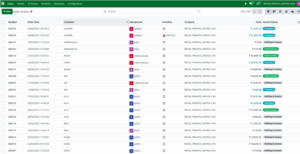
Sales teams often forget to follow up on quotations, especially when dealing with high volumes. This rule ensures every quotation is followed up consistently.
What this does:
Automatically creates a follow-up task whenever a quotation is sent, reducing missed opportunities.
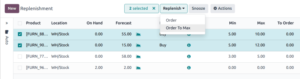
Inventory issues often occur when stock levels are checked manually. This rule ensures replenishment happens before stock runs out.
What this does:
Continuously monitors stock levels and generates purchase orders when inventory drops too low.
Always test automation rules in a staging or sandbox environment before deploying to production. Disable external communications during testing and validate rules using individual records first to prevent unintended bulk actions.
Before building automation rules, review and document existing workflows. Identify manual steps and inefficiencies before automation is introduced. The goal is to improve processes first, not replicate broken ones. Define measurable outcomes such as reduced processing time or faster response cycles.
Start with simple, high-impact automation such as lead assignment or invoicing. Once stable, expand gradually to other departments. This reduces risk and improves adoption.
Maintain clear naming conventions and document each rule with its purpose, owner, and update history. This ensures long-term maintainability and reduces confusion when scaling automation across teams.
Prefer native no-code automation features where possible to ensure upgrade stability. Organise rules logically and monitor for overlapping triggers or recursive executions that could impact performance.
For businesses that need help designing or implementing Odoo automation workflows, working with an experienced Odoo implementation partner can ensure proper configuration and scalability.
Automation rules in Odoo reduce manual intervention across key business workflows, improving both speed and operational consistency.
By automating repetitive processes such as approvals, record updates, and notifications, businesses can:
More importantly, automation supports scalable operations. As transaction volumes increase, workflows continue to run consistently without requiring proportional increases in headcount. This is particularly relevant for growing teams managing sales pipelines, inventory movements, and financial processes.
With Odoo 19’s expanded low-code capabilities and AI-assisted features, businesses can further refine automation logic with less technical effort, making workflow optimisation more accessible across departments. Learn more about Odoo 19 AI features and automation enhancements.
Ketika membahas ERP di Indonesia pada 2026, pertanyaannya bukan lagi sekadar fitur apa yang tersedia, tetapi sistem seperti apa yang mampu mendukung arah perkembangan bisnis dalam jangka panjang.
ERP telah berevolusi dari alat administratif menjadi fondasi operasional yang memengaruhi efisiensi, kolaborasi antar fungsi, serta kualitas pengambilan keputusan. Dengan meningkatnya kompleksitas bisnis, multi-cabang, multi-channel, dan tuntutan kepatuhan terhadap regulasi, pemilihan ERP kini menjadi keputusan strategis, bukan sekadar keputusan teknologi.
Untuk memberikan gambaran cepat, berikut perbandingan beberapa sistem ERP yang umum digunakan di Indonesia:
| Sistem ERP | Cocok Untuk (Industri) | Tingkat Harga | Kepatuhan Pajak Indonesia | Keunggulan Utama |
| Odoo | UMKM, distribusi, manufaktur ringan | Rendah – Menengah | Ya (dengan lokalisasi) | Modular dan fleksibel, mudah dikustomisasi |
| SAP S/4HANA | Enterprise, manufaktur skala besar | Tinggi | Ya | Sangat kuat untuk proses kompleks dan skala besar |
| Microsoft Dynamics 365 | SMB hingga mid-market | Menengah | Ya | Integrasi kuat dengan ekosistem Microsoft |
| Oracle NetSuite | Perusahaan global, multi-entitas | Menengah – Tinggi | Terbatas (butuh partner) | Cloud-native, cocok untuk operasi internasional |

Jika kita amati arah pasar, keputusan ERP pada 2026 semakin dipengaruhi oleh perubahan cara bisnis beroperasi, bukan semata oleh perkembangan teknologi. Ada beberapa tren utama yang membentuk lanskap ERP di Indonesia saat ini, dan tren ini akan langsung memengaruhi bagaimana Anda memilih sistem yang tepat.
Pendekatan cloud-first kini menjadi standar baru. Semakin banyak organisasi beralih ke ERP berbasis cloud karena fleksibilitas, akses lintas lokasi, serta efisiensi biaya infrastruktur.
Perusahaan tidak lagi ingin terbebani pengelolaan server internal, pembaruan manual, atau keterbatasan akses dari luar kantor. Untuk bisnis dengan banyak cabang atau tim hybrid, cloud menghadirkan visibilitas dan kontrol yang jauh lebih baik.
Model berlangganan juga membuat perencanaan anggaran lebih terprediksi dibanding investasi perangkat keras besar di awal.
Yang perlu Anda tahu:
Tidak semua ERP “cloud” itu sama. Platform seperti Oracle NetSuite dan Odoo (Odoo Online) dibangun sebagai native cloud, sementara solusi seperti SAP S/4HANA sering kali masih memerlukan setup private cloud atau hybrid yang lebih kompleks.
Istilah AI mungkin terdengar abstrak, namun dalam ERP modern, manfaatnya sangat nyata. Sistem kini dapat memprediksi permintaan, menganalisis arus kas, mendeteksi transaksi mencurigakan, hingga memberikan rekomendasi pembelian otomatis.
AI tidak menggantikan peran manajemen, tetapi berfungsi sebagai sistem pendukung keputusan yang mempercepat analisis dan mengurangi kesalahan manusia.
Dalam konteks Indonesia, implementasinya sudah semakin konkret. Platform seperti Odoo mulai digunakan untuk automasi rekonsiliasi bank lokal (BCA, Mandiri) dengan cara “mempelajari” pola transaksi. Hasilnya, pekerjaan manual tim finance dapat berkurang secara signifikan, bahkan hingga sekitar 80% dalam beberapa kasus.
Di pasar yang kompetitif, kecepatan dalam membaca data dan mengambil keputusan menjadi keunggulan strategis.
Perusahaan semakin selektif dalam mengadopsi teknologi. Sistem monolitik yang kompleks dan sulit dimodifikasi mulai ditinggalkan.
Pendekatan modular memungkinkan implementasi bertahap.
Keunggulan pendekatan ini:
Dalam praktiknya, Odoo menjadi salah satu contoh paling fleksibel karena memungkinkan adopsi per modul dengan biaya awal yang relatif rendah. Sebaliknya, solusi seperti Microsoft Dynamics 365 sering kali membutuhkan paket implementasi yang lebih besar sejak awal.
Kesadaran akan kebutuhan industri yang berbeda semakin meningkat. Tidak ada satu ERP yang benar-benar “one-size-fits-all”.
Manufaktur membutuhkan MRP dan kontrol produksi. Distribusi memerlukan manajemen gudang yang kuat. Konstruksi membutuhkan pengelolaan proyek yang terintegrasi, sementara sektor kesehatan menghadapi regulasi data yang ketat.
ERP generik tanpa penyesuaian industri sering kali menambah pekerjaan manual. Karena itu, kemampuan sistem untuk mengikuti workflow bisnis menjadi faktor pembeda yang signifikan.
Di Indonesia, aspek kepatuhan bukan sekadar fitur tambahan, ini adalah kebutuhan utama.
ERP harus mampu mendukung:
Tanpa dukungan ini, perusahaan sering harus menambahkan sistem terpisah atau melakukan banyak proses manual, yang justru meningkatkan risiko kesalahan dan beban kerja administratif.
Karena itu, ERP global tanpa modul lokalisasi Indonesia sering kali bukan pilihan terbaik. Sistem yang ideal adalah yang mampu menggabungkan standar global dengan adaptasi lokal secara langsung.
💡 Pro Tip:
Jangan terpaku pada nama besar brand global. Di Indonesia, kriteria “Best ERP” ditentukan oleh seberapa matang lokalisasi pajak (e-Faktur) dan standar PSAK-nya secara native. Memilih sistem yang mengandalkan “tambahan” pihak ketiga di kemudian hari sering kali memicu biaya tersembunyi dan risiko ketidakpatuhan saat audit pajak.

Dalam banyak kasus, proyek ERP gagal bukan karena kekurangan fitur, tetapi karena regulasi tidak dipertimbangkan sejak awal.
Di Indonesia, sistem ERP harus mampu mendukung:
Selain itu, isu keamanan data semakin sensitif. Dengan meningkatnya digitalisasi, perusahaan harus memastikan kontrol akses, audit trail, dan manajemen hak pengguna berjalan dengan baik.
Memilih software ERP terbaik berarti juga memilih sistem yang mampu menjaga reputasi dan kepatuhan bisnis Anda.
Daripada mencari “yang terbaik”, secara umum, lebih efektif menyesuaikan pilihan dengan ukuran bisnis, kebutuhan, dan tahap pertumbuhan perusahaan.
UMKM membutuhkan sistem yang mengintegrasikan fungsi inti, keuangan, inventori, penjualan, dan pembelian, tanpa biaya atau kompleksitas tinggi. ERP berbasis cloud memungkinkan akses jarak jauh, operasi multi-cabang, dan penskalaan bertahap.
Microsoft Dynamics 365 Business Central cocok untuk bisnis yang sudah menggunakan ekosistem Microsoft, sedangkan Odoo lebih fleksibel berkat arsitektur modular dan kemampuan kustomisasi lokal.
Keputusan:
Perusahaan besar membutuhkan ERP yang mampu menangani konsolidasi multi-entitas, volume transaksi tinggi, dan laporan kompleks.
SAP S/4HANA masih menjadi standar untuk pengelolaan dan skala besar. Namun, fleksibilitas implementasi kini sama pentingnya.
Pemicu Keputusan:
Banyak perusahaan menggabungkan sistem, menggunakan SAP S/4HANA untuk operasi inti dan Odoo untuk divisi ritel atau distribusi yang lebih cepat diimplementasikan.
Model modular semakin relevan. Bisnis di Indonesia sering bertumbuh secara bertahap. Dengan ERP modular, perusahaan dapat mengimplementasikan hanya modul yang dibutuhkan hari ini, misalnya finance dan sales, lalu menambahkan manufacturing atau HR di fase berikutnya.
Arsitektur modul Odoo memungkinkan integrasi lintas industri: manufaktur, distribusi, ritel, hingga jasa profesional.
Pendekatan ini mengurangi risiko implementasi besar sekaligus menjaga fleksibilitas.
Banyak perusahaan masih menggunakan sistem lama yang mendekati akhir siklus hidupnya.
Migrasi ERP bukan hanya soal memindahkan data. Ini tentang:
Di Indonesia, migrasi juga harus memastikan kepatuhan terhadap PSAK, PPN, serta pelaporan statutori.
Dengan perencanaan yang matang, migrasi bisa menjadi momentum transformasi, bukan sekadar pergantian software.

Sebagai mitra bisnis, kami sering melihat satu kesalahan umum: menganggap semua industri membutuhkan ERP yang sama. Padahal, struktur biaya dan siklus operasional sangat bervariasi. Sistem “satu ukuran untuk semua” sering kali menjadi beban, bukan aset.
Di sektor manufaktur, tantangan utamanya meliputi pengendalian bahan baku, perencanaan produksi berbasis permintaan, serta visibilitas terhadap proses produksi (work-in-progress). Sistem juga harus mampu menghubungkan forecast penjualan dengan pembelian dan produksi.
Untuk perusahaan manufaktur skala besar di Indonesia, SAP S/4HANA sering digunakan karena kemampuannya menangani proses produksi yang kompleks dan operasi multi-pabrik.
Sementara itu, untuk perusahaan manufaktur menengah, Odoo menjadi pilihan karena pendekatannya yang modular dan fleksibel, memungkinkan implementasi bertahap sesuai kebutuhan.
Tanpa integrasi yang kuat antara penjualan, produksi, dan inventori, risiko kelebihan atau kekurangan stok akan terus terjadi.
Di industri kesehatan, ERP harus mampu menangani pengelolaan obat berbasis batch, pelacakan tanggal kedaluwarsa, serta perlindungan data pasien sesuai regulasi yang ketat.
Organisasi kesehatan berskala besar umumnya menggunakan SAP S/4HANA atau Oracle NetSuite karena kekuatan pada aspek kontrol, audit trail, dan tata kelola data.
Untuk klinik atau institusi yang sedang berkembang, Odoo sering digunakan karena fleksibel dalam penyesuaian alur kerja tanpa kompleksitas sistem enterprise.
Di sektor ini, ERP tidak hanya mendukung efisiensi, tetapi juga menjaga kepatuhan dan kredibilitas institusi.
Industri konstruksi membutuhkan ERP yang mampu mengelola proyek secara menyeluruh, mulai dari anggaran, timeline, hingga alokasi sumber daya.
Platform seperti Microsoft Dynamics 365 banyak digunakan karena integrasinya antara keuangan dan manajemen proyek.
Di sisi lain, Odoo menawarkan fleksibilitas untuk perusahaan yang membutuhkan sistem proyek yang dapat disesuaikan tanpa kompleksitas tinggi.
Tanpa visibilitas proyek secara real-time, potensi pembengkakan biaya (cost overrun) akan sulit dikendalikan.
Sektor ritel dan distribusi sangat bergantung pada kecepatan dan akurasi data. Kontrol stok real-time, integrasi POS, manajemen gudang, dan sinkronisasi antar cabang menjadi kebutuhan utama.
Untuk perusahaan dengan operasi lintas negara atau multi-entitas, Oracle NetSuite sering digunakan karena arsitektur cloud-native dan skalabilitasnya.
Sementara itu, Odoo menjadi pilihan populer untuk bisnis yang berkembang karena integrasi kuat antara inventory, POS, dan eCommerce dalam satu sistem.
Keterlambatan data, bahkan dalam hitungan jam, dapat berdampak langsung pada penjualan dan tingkat stok.
Untuk membantu proses pemilihan, berikut gambaran kelebihan dan kekurangan dari beberapa sistem ERP yang paling umum digunakan di Indonesia:
Cocok untuk: UKM, startup berkembang, dan bisnis yang membutuhkan kustomisasi tinggi
Kelebihan:
Kekurangan:
Cocok untuk: Perusahaan besar, multinasional, dan organisasi kompleks
Kelebihan:
Kekurangan:
Cocok untuk: Perusahaan menengah hingga besar yang menggunakan Microsoft
Kelebihan:
Kekurangan:
Cocok untuk: Perusahaan berbasis teknologi dan bisnis jasa yang ingin full cloud tanpa server lokal
Kelebihan:
Kekurangan:
Tidak ada satu solusi yang cocok untuk semua.
Faktor keputusan utama:
Checklist implementasi:
Keberhasilan implementasi ERP tidak berhenti saat sistem mulai digunakan. Tanpa pelatihan yang tepat, banyak organisasi hanya memanfaatkan sebagian kecil dari kemampuan sistem ERP.
Karena itu, pelatihan pengguna yang terstruktur dan dukungan pasca go-live menjadi bagian penting dari proses implementasi. Pendekatan ini membantu tim internal memahami alur kerja baru, mengurangi resistensi perubahan, serta memastikan sistem benar-benar digunakan secara optimal.
Di sinilah peran partner implementasi menjadi krusial.
M+ Software, misalnya, tidak memulai proyek dengan demo fitur. Kami memulai dengan memahami proses bisnis, risiko, dan arah pertumbuhan klien. Dengan pendekatan berbasis SCRUM, proyek dipecah menjadi fase terukur, memastikan kualitas, timeline, dan biaya tetap terkendali.
ERP bukan tentang instalasi software. Ia tentang orkestrasi proses.
ERP di Indonesia pada 2026 dipengaruhi oleh cloud, modularitas, AI, dan regulasi ketat. Tren teknologi hanya relevan jika sesuai konteks bisnis.
Setiap organisasi unik, dari manufaktur hingga distribusi cepat atau multi-entitas, dan kebutuhan ini menentukan sistem ERP yang tepat. Sistem ERP terbaik bukan yang paling mahal atau populer, tapi yang selaras dengan strategi, mendukung operasi saat ini, dan fleksibel menghadapi perubahan.
Pertimbangkan: apakah ERP ini bisa mendukung pertumbuhan lima tahun ke depan, menyesuaikan ekspansi dan regulasi, serta menjadi enabler, bukan bottleneck?
ERP bukan proyek IT jangka pendek; tapi fondasi operasional yang layak dirancang dengan visi jangka panjang dan partner implementasi yang memahami teknologi sekaligus dinamika bisnis di Indonesia.
When a business starts thinking about updating their operational software, arguably one of the most sensitive concerns consistently surfaces quickly;
Not the technology – not even the cost – but accounting.
For many business owners and finance teams, the idea of replacing their accounting system is where the topic rapidly becomes uncomfortable. Accounting processes are deeply embedded in the day-to-day running of every company, from reporting and compliance to internal controls and financial workflows. Teams know the system, trust the workflows, and come to rely upon its usability.
The common reaction to this awkward question is: “If we change our ERP, do we also have to change our Accounting as well?”. An assumption alone that can delay an entire transformation project.
Finance teams tend to have very good reasons for being cautious. Over the fullness of time, your Accounting system becomes the backbone of your financial operations. Reports are built around them, processes are consequently structured, and teams develop habits that allow them to work efficiently. Any significant change to this integral area of your operations can feel risky.
The bulk of traditional ERP platforms reinforce this concern because they require businesses to adopt their Accounting module as part of any implementation. In such a situation, the reality of changing ERP equates to adopting their Accounting, something which can cause hesitation to proceed. As a result, organisations sometimes continue operating with disconnected systems simply because the perceived disruption feels too overwhelming.
A big misconception – something many buyers discover too late – is that all functional changes pertaining to an ERP transformation must be implemented all in one phase. Modern platforms like Odoo allow businesses to take a staged approach so, instead of replacing every module immediately, your organisation can benefit from beginning by implementing only the necessary modules to increase efficiency of specific areas of your operations. For example, you might consider starting with CRM and Sales, Stock Control and Operations, Project Management or Field Service. These are common operational areas which bring rapid benefits from greater interdepartmental integration and automation.
Meanwhile, Accounting processes can remain unchanged during the early stages of your transformation project, removing significant barriers and allowing your team to focus on improving operations first.
Taking this modular approach is a game-changer with how your ERP transformation project will be experienced within your company. Instead of a large, disruptive transformation, improvements are introduced step-by-step. Your team can become familiar with the system gradually, where processes can evolve naturally as your organisation grows more comfortable with the platform. In practice, this will reduce both risk and internal resistance that can accompany ERP initiatives.
Further, your business is not forced to redesign everything overnight, with the luxury to modernise what matters most, maintaining stability in critical areas such as your accounting.
Another reason as to why a progressive approach to change can work well for you is the availability of integrations. Odoo benefits from a large ecosystem of connectors and community-developed applications. These integrations allow different systems to communicate with each other while your ERP environment evolves. This means your company can continue to use established tools while gradually introducing new capabilities, rather than rebuilding your entire system architecture in a single project.
In practice, this approach is often refined through experience. As one of our team members shared after working on early Odoo/Xero integrations:
“At first, I tried to integrate everything, invoices, bills, payments, journal entries. On paper, it made sense. In reality, it became fragile and difficult to maintain. What I learned is that most businesses don’t need that level of complexity.
In most successful setups, we simply send invoices from Odoo to Xero. The accounting system then handles what it does best, especially bank reconciliation, thanks to strong bank feeds that tools like Xero or MYOB have refined over the years.”
This shift in mindset is key. Rather than forcing two systems to behave identically, it’s about letting each tool play to its strengths.
“Another lesson was around Cost of Goods Sold. Each system, Odoo, Xero, MYOB, calculates COGS differently. Trying to sync it perfectly is not only complex, it’s unrealistic. What works better is accepting that difference and, in many cases, sending a single COGS journal entry periodically instead of trying to match every movement.”
There are also practical considerations that go beyond accounting logic:
“One important question we now always ask is: where do you want to manage your stock? If Odoo is your operational system, it should remain the source of truth for stock quantities. In that case, invoices pushed to Xero don’t need detailed product lines, they can simply reflect descriptions and amounts, while inventory stays fully managed in Odoo.”
These real-world lessons highlight an important point: successful integrations are rarely about syncing everything, they’re about syncing what actually matters.
Even when technology makes change easier, ERP projects are rarely just technical projects – they involve habits, processes, and teams who have been working with the same tools for years. It’s normal for hesitation to appear, particularly when areas like Finance are involved. This is where change management becomes important. Introducing new systems progressively helps teams adapt at your own pace, understand the value of the new tools, and build confidence in your newly chosen platform. When transitions are managed carefully, ERP adoption will become much smoother.
In summary, the biggest barrier to ERP adoption for most organisations is not the software itself, but the belief that everything must change all at once. In reality, a modular ERP transformative approach offers a much more flexible path forward. By introducing new capabilities gradually, your business can improve its operational efficiency, better connect all your systems, and prepare for future growth without immediately disrupting the areas that are already working well. Simply realising that Accounting doesn’t have to change on day one is enough to move the ERP conversation forward.
If you’d like to learn more or see how we’ve tackled these challenges, contact us and one of our integration specialists will be happy to help.
Sales logs lead in a CRM. Finance tracks accounts in spreadsheets. Operations updates inventory in another tool, or WMS. After years of advising Australian mid-market firms, we’ve seen how these disconnected systems create hidden costs. Manual data entry causes errors, reports conflict, and decisions are delayed.
Our audits show duplicate entries alone can skew forecasts by up to 15%. Inconsistent reporting undermines confidence, and slow decisions reduce competitiveness. These inefficiencies drain resources that could drive growth.
As much as we expect our clients to use Odoo at its full capacity without integrations, complex organisations sometimes need integrations to slowly adopt the Odoo without removing all their 3rd party system.
ERP integration solves this by linking disparate systems into a unified ecosystem. Data flows automatically, updates happen in real time, and teams operate from a single source of truth.
This guide explains ERP integration, the approaches that suit different business needs, and practical steps Australian organisations can take to implement it successfully.
ERP integration connects your Enterprise Resource Planning system with other business applications, enabling seamless data flow across your organisation. Many businesses run ERP software but still rely on manual data transfers, spreadsheets, or batch uploads. True integration removes these touchpoints, synchronising data automatically and in real time.
Integrated systems reduce errors, accelerate processes, and provide consistent, current information for all teams. For Australian businesses, this means sales see real-time inventory, finance gets up-to-date transaction data for BAS reporting, and operations track orders without manual cross-checks.
In our work with Australian SMEs, we find that a “Single Source of Truth” isn’t just a technical goal; it’s a risk management strategy. When systems integrate properly, updates in one application automatically reflect across connected platforms, ensuring everyone works from identical, current information.
The Cost of Disconnection (What We See in the Field):
The Integrated Advantage:
True ERP integration goes beyond simple connectivity; it creates a unified ecosystem where data flows automatically. Instead of relying on manual entry, which introduces errors and delays, your systems communicate directly through secure protocols.
For example, when a customer places an order on your e-commerce site, a properly integrated system triggers multiple actions: inventory levels update in real time, digital invoices are generated, and fulfilment teams receive picking instructions instantly. No re-keying, no delays, and full transparency for finance and operations.
For Australian businesses, ERP integration also supports compliance. Payroll and ERP integration ensures superannuation, Fair Work record-keeping, and other statutory calculations are handled automatically, reducing errors and keeping you audit-ready.
Different integration approaches suit different business contexts. Selecting the right model requires balancing technical capability, long-term scalability, compliance obligations, and total cost of ownership, not just upfront implementation expense.
Point-to-point integration creates direct connections between two systems, for example, linking an ERP to a CRM to synchronise customer and order data.
This approach works when:
The hidden cost appears over time. Although point-to-point integration seems affordable initially, every system upgrade requires connections to be reviewed and often reworked. As more systems are added, the number of connections grows rapidly, increasing maintenance effort, downtime risk, and architectural fragility.
This approach may suit early-stage environments, but does not scale well long-term.
Custom API integration uses application programming interfaces to build tailored connections between systems. APIs provide structured methods for data exchange, while custom development aligns integration logic to operational workflows.
This approach enables organisations to:
One frequent challenge in API integration is data mapping conflict, for example, when a “Customer Name” field is formatted differently across systems. Without transformation layers, these mismatches can cause sync failures or data corruption. Robust integration includes automated transformation and validation layers to prevent these issues.
Custom API integration suits Australian businesses with industry-specific compliance requirements, such as linking project costing systems with payroll and taxation reporting.
The trade-off: higher upfront investment and ongoing dependency on skilled developers.
An ESB introduces a centralised integration hub. Instead of systems connecting directly to one another, each connects to the hub, which manages routing, orchestration, and data transformation.
This model reduces architectural fragility. If a CRM is replaced later, only the connection to the hub needs to be reconfigured, rather than every system in the environment. This decoupled structure improves scalability and long-term flexibility.
In cloud-driven environments, platforms such as Odoo provide native integration capabilities that operate effectively within a hub-style architecture. Australian businesses often partner with certified Odoo experts to implement these solutions and standardise data exchange.
Benefits include:
ESB suits organisations with:
iPaaS delivers cloud-based integration through managed platforms with pre-built connectors and orchestration tools. It reduces infrastructure overhead and simplifies hybrid integration between SaaS and on-premises systems.
Advantages include:
For Australian businesses, integration increasingly intersects with regulatory compliance. Automated data exchange between ERP and payroll systems supports Single Touch Payroll (STP) Phase 2 reporting to the ATO. Proper integration reduces manual error and ensures reporting aligns with statutory obligations.
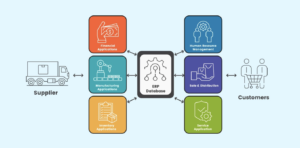
Strategic ERP integration is essential for delivering a significant business impact. However, it’s not without its challenges. Here’s what to connect and how to tackle common hurdles for Australian businesses:
Sync sales leads, customer contact details, purchase history, and billing information. Integration ensures sales and finance teams work from the same customer data.
Many businesses struggle with data duplication when integrating CRMs such as Salesforce or HubSpot with their ERP systems. Without proper mapping, duplicate customer records can create confusion between sales and finance teams, causing billing errors.
Automate online order processing and inventory synchronisation. Australian businesses often integrate platforms like Shopify Plus, WooCommerce, and BigCommerce to reduce manual order entry and avoid overselling.
Businesses often overlook tax mapping. For example, if your Shopify tax settings don’t align perfectly with your ERP’s GST codes, your BAS reporting can turn into a manual correction nightmare.
In a recent project, we connected BigCommerce with NetSuite for an Australian retailer. By configuring ‘Available-to-Promise’ logic, we prevented overselling inventory stored in Melbourne to customers in Brisbane, reducing customer complaints and refunds.
Connect payroll, employee records, recruitment, and leave management. Australian integration must ensure compliance with Fair Work, including automated pay slip generation. Pay slips must include employer and employee details, pay period, gross and net pay, superannuation contributions, and fund details; all easily managed with the right integrations.
Incorrectly automating award rates within ERP and HR systems has led some businesses to underpay staff, risking fines from the Fair Work Ombudsman.
For a Sydney-based logistics company, we integrated Xero Payroll with their ERP. This ensured compliance with Fair Work requirements and automated award rate updates, saving 8 hours weekly on manual adjustments.
Link bank feeds, invoicing, and payment processing. Integration supports Australian tax obligations, including Business Activity Statements (BAS). Processes such as GST, PAYG, and fringe benefits tax (FBT) reporting benefit directly from automated data collection across integrated systems.
A mismatch in bank feed reconciliation rules can distort GST reporting. We’ve seen businesses underreport GST due to duplicate entries in their ERP’s general ledger.
For organisations running Odoo for operations while retaining Xero for financial reporting, the decision to integrate or consolidate systems requires careful evaluation of tax mapping, reconciliation workflows, and long-term scalability.
Connect dashboards and reporting tools to pull live data for KPI tracking and business intelligence. Integration eliminates manual report generation and ensures decision-makers have access to current information.
For an Australian wholesaler, we integrated PowerBI with their ERP. This uncovered a 12% margin leak in their regional shipping routes, a problem their standard ERP reports had missed for years.
Sync cost tracking, timelines, and resource allocation. Integration provides visibility into project profitability and helps avoid scheduling conflicts.
Many businesses struggle to gain visibility into resource allocation when integrating tools like Asana or Jira into their ERP systems, leading to overbooked teams and missed deadlines.
Integrate stock management, production planning, and work orders. Real-time inventory visibility prevents stockouts and improves order fulfilment.
Australian businesses with multiple warehouses often struggle with inventory synchronisation. For example, failing to factor in shipping delays between Perth and Sydney can lead to overcommitted orders.
In a project for a manufacturing company, we integrated Microsoft Dynamics 365 with their warehouse systems. This allowed real-time stock visibility across their Brisbane and Adelaide locations, improving order fulfilment accuracy by 20%.
By addressing these hurdles and focusing on specifics such as tax laws, compliance requirements, and region-specific platforms, your ERP integration can go beyond functionality and truly add value to your business.
Even when the right systems are selected, integration can fail without proper governance. The most common risks occur at a structural level rather than within any single platform.
Poor master data management causes errors to cascade across CRM, finance, payroll, and inventory systems. Integration requires clear ownership of customer, supplier, product, and employee records before systems are connected.
Integration introduces new data pathways. Access permissions, audit logging, and encryption controls must be reviewed to ensure compliance with the Australian Privacy Act.
Integration is not a one-time expense. Ongoing API changes, system upgrades, and evolving business requirements require continuous investment. Businesses that underestimate long-term support costs often experience integration breakdowns within 2–3 years.
Integrated systems alter workflows. Without structured training, stakeholder communication, and phased rollout, user resistance can undermine integration ROI.
ERP environments evolve. Software updates, tax regulation changes, and compliance requirements (BAS, PAYG, FBT, Fair Work updates) require integration monitoring and periodic review.

Successful Australian ERP integrations follow a phased approach to manage risk and ensure ROI.
ERP integration is no longer a nice-to-have IT project; it is the baseline for scaling your business in a high-compliance environment. As we’ve explored, the shift from manual Export-to-CSV workflows to automated synchronisation isn’t just about saving time; it’s about de-risking your operations.
Whether it’s ensuring Fair Work compliance during a payroll sync or preventing GST leakage between your e-commerce store and general ledger, the most successful integrations prioritise accuracy and governance over simple connectivity.
The Strategic Question for Your Business:
You don’t need to integrate everything at once. The key is identifying which data island is currently costing you the most in manual labour or compliance risk. By starting with high-impact connections like Finance or HR, you build a foundation for a truly data-driven enterprise.
Ready to audit your current systems? Speak with our integration specialists to identify where your biggest data leaks are hiding.
Enterprise Resource Planning (ERP) systems are now the core infrastructure for Australian businesses operating in a complex regulatory and competitive environment. In 2026, the market is shifting toward cloud native platforms, AI-driven automation, and modular solutions that scale with business needs.
Selecting an ERP is not about finding the best system, but about choosing one that aligns with your size, industry, growth plans, and compliance requirements. This guide outlines current ERP trends in Australia and how to assess solutions that fit your organisation, whether you are in manufacturing, healthcare, or the mid-market, and whether you are consolidating multiple systems.

Australia’s ERP market has evolved significantly over the past decade. The days of relying solely on locally developed, on-premises systems are largely behind us. Today’s landscape is dominated by global cloud platforms, supplemented by specialised local solutions and open-source alternatives.
The Australian ERP market serves three distinct segments, each with unique requirements:
The transition from on-premise to cloud ERP has accelerated. Cloud platforms reduce upfront capital expenditure, cut server maintenance costs, and enable remote access; a key factor with hybrid work models. Australian businesses are increasingly comfortable with SaaS ERP solutions, provided they meet local data residency and compliance requirements.
Global vendors like Microsoft, SAP, and Oracle dominate enterprise and mid-market segments, while emerging players like Odoo offer flexible, modular alternatives for businesses seeking customisation without enterprise-level costs.
Several key trends are shaping how Australian businesses approach ERP in 2026:
Cloud ERP has moved from a nice-to-have to an expected. SaaS platforms reduce IT overhead, improve scalability, and support distributed teams. For many Australian businesses, cloud ERP means faster implementation, automatic updates, and predictable subscription costs.
However, cloud-first doesn’t mean abandoning on-premise entirely. Hybrid models where sensitive data remains on local servers whilst non-critical systems run in the cloud are common in industries with strict data sovereignty requirements such as healthcare or defense.
AI is no longer experimental in ERP systems. In 2026, practical AI applications include:
The focus is on AI that solves specific business problems, not generic intelligence features. Australian businesses are adopting AI where it demonstrably improves efficiency or reduces risk.
Modern ERP systems are built on modular frameworks. Instead of implementing a monolithic system, businesses can deploy core modules (finance, inventory, HR) and add functionality as needed. This approach reduces initial costs and implementation time whilst maintaining flexibility for future growth.
Two-tier ERP strategies are also gaining traction. Large enterprises run robust, standardised systems at headquarters, whilst subsidiaries or divisions use lighter, more agile platforms that integrate with the core system.
Generic ERP no longer suffices for many industries. Manufacturers need production planning and quality control. Healthcare providers require patient data management and regulatory compliance. Construction firms need project costing and subcontractor management.
ERP vendors are responding with industry-specific modules and pre-configured solutions that address these unique requirements out of the box.
Australian businesses face stringent compliance requirements. ERP systems must support ATO reporting obligations, GST calculations, Single Touch Payroll (STP), and the upcoming Payday Super mandate. Additionally, cybersecurity standards, such as the ACSC Essential Eight, influence ERP selection and configuration.
Data sovereignty, storing sensitive business data within Australia is a non-negotiable requirement for many organisations, particularly in government, healthcare, and finance sectors.
Decision-makers expect real-time visibility into business performance. Modern ERP systems centralise data from across the organisation, providing live dashboards, automated reporting, and scenario modelling. Integration with IoT devices (for manufacturing and logistics) further enhances real-time data capture and analysis.

Regulatory compliance is a critical factor when selecting an ERP system in Australia. The right platform doesn’t just manage your business processes it actively supports compliance with Australian tax, employment, and cybersecurity regulations.
Your ERP should manage:
From 1 July 2026, Australian employers must pay superannuation guarantee at the same time as salary and wages, a significant change from the previous quarterly payment cycle. The Treasury Laws Amendment (Payday Superannuation) Act 2025 is now law.
Your ERP must support this requirement. Look for systems that:
If your current ERP can’t support Payday Super, now is the time to upgrade or switch platforms. The ATO’s first-year compliance approach (outlined in PCG 2026/1) provides some flexibility, but businesses should aim for full compliance from day one.
Australia adopted the PEPPOL eInvoicing framework to standardise electronic invoicing. ERP should support compliant PEPPOL exchange, including current PINT A-NZ standards, to reduce manual processing and meet government supply requirements.
ERP systems should align with the Australian Signals Directorate Essential Eight framework. Key capabilities include:
Cloud vendors may provide compliant infrastructure, but configuration and governance remain your responsibility.
Organisations in regulated sectors must ensure sensitive data remains within Australian jurisdiction and complies with the Privacy Act and Australian Privacy Principles. Confirm:
Modern ERP systems should simplify compliance through:
Your ERP should make regulatory reporting and audit readiness routine rather than reactive.

There is no universal best ERP system. The right choice depends on your business size, industry, growth plans, budget, and risk appetite. Here’s a look at ERP categories commonly used in Australia and the scenarios they serve.
Businesses with 50–500 employees often reach a point where spreadsheets and basic accounting software no longer suffice. Integrated systems are needed to consolidate finance, inventory, CRM, and operations.
Businesses with 500+ employees or complex international operations require robust ERP platforms for multi-entity consolidation, advanced supply chain management, global tax compliance, and high transaction volumes.
Odoo deserves special attention as a flexible, open-source ERP platform. Its modular design means you start with core modules (accounting, CRM, inventory) and expand as needed. Odoo supports:
Odoo’s open-source nature means lower licensing costs, but you’ll need to invest in skilled implementation partners to configure and customise the platform. For businesses with unique processes or those seeking maximum flexibility, Odoo represents a compelling alternative to proprietary ERP systems.
Some Australian businesses still operate on legacy ERP systems; older platforms that are approaching end-of-life or no longer receive vendor support. Common examples include outdated versions of SAP ECC, older MYOB platforms, or custom-built systems developed decades ago.
If you’re on a legacy system, 2026 is a critical year to plan your migration. Key considerations:
Migrating from legacy ERP is complex, but delaying increases risk and cost. Engage an experienced implementation partner to plan your transition, prioritise data migration, and ensure compliance continuity.
ERP systems must address industry-specific challenges. Here’s how different sectors approach ERP in Australia:
Manufacturers need production planning, shop floor control, quality management, and supply chain visibility. ERP systems must handle:
Learn how ERP automation can streamline these processes for Australian manufacturers.
Healthcare providers (hospitals, clinics, and aged care) require ERP systems that manage patient data, billing, compliance, and operations:
Construction and infrastructure businesses need project-centric ERP systems that track costs, manage subcontractors, and handle complex billing:
Retailers and distributors need ERP systems focused on inventory, point-of-sale integration, and customer experience:
Accounting firms, legal practices, and consultancies need ERP systems that handle time tracking, project billing, and client management:
Industry-specific ERP modules or pre-configured solutions reduce implementation time and ensure your system addresses your unique operational needs from day one.
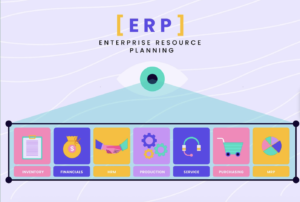
Choosing and implementing an ERP system is one of the most significant technology decisions your business will make. There is no one-size-fits-all solution. Success depends on aligning your ERP choice with your business context, operational needs, and strategic goals.
If you’re a small or mid-market business evaluating ERP systems, use this checklist:
ERP implementations fail when businesses:
Work with experienced implementation partners, involve key stakeholders early, and commit to the necessary investment in time and resources.
Australia’s ERP environment in 2026 is defined by cloud adoption, modular design, practical AI, and stricter compliance obligations. Regulatory changes such as Payday Super (starting July 2026), PEPPOL e-invoicing, and heightened cybersecurity expectations mean ERP is now a strategic risk and governance decision, not just an IT upgrade.
There is no universal best platform. The right ERP depends on your size, industry complexity, growth plans, and compliance exposure. Mid-market businesses often prioritise scalable, cloud-based systems, while larger enterprises require robust platforms capable of managing multi-entity and international operations.
When selected and implemented correctly, ERP becomes a competitive advantage; when misaligned, it becomes a constraint. The difference lies in disciplined evaluation and strategic alignment.
Anyone who has heard of Odoo ERP (15 million-plus Users globally) will know it includes quite powerful Accounting functionality, designed to manage everything from invoicing and bank reconciliation to multi-company consolidation and detailed reporting. You would also know that more popular – as a stand-alone solution – Xero is arguably the world’s most widely used Cloud-based Accounting targeted at the SME space. Many businesses who use Odoo ERP hang-on to their instance of Xero for their Accounting needs — particularly after adopting Odoo for their operational, customer, stock and project requirements.
As an accredited and expert Odoo Partner across Australia, New Zealand, Indonesia, Japan and Noumea, M+ Software has helped dozens of organisations connect both Odoo and Xero in an effective, pragmatic way. Over time, we’ve learned that the right approach isn’t about connecting everything — it’s about connecting what really matters.
In this article we explore why such businesses choose to retain Xero, and why others fully migrate to Odoo Accounting, particularly what M+ Software has learned from years of implementing Odoo integrations across Australia and the Pacific.
There are plenty of reasons a business may prefer to stay with Xero for its financials while using Odoo for everything else.
For these reasons, the aim of an Odoo < > Xero integration is rarely to replace one with the other — it’s to make them work together more smoothly.
On the other hand, some organisations ultimately choose to consolidate everything in Odoo Accounting. Here’s why that move can be worth the effort:
In practice, M+ Software regularly see businesses transform onto Odoo ERP maintaining Xero Accounting for familiarity, then gradually adopt Odoo Accounting as their internal capabilities grow, and realise the benefit of the points above.
When we first began integrating Odoo ERP with Xero Accounting, there is the temptation to connect everything — bank statements, journals, sales orders, purchase orders, even products.
In theory it all seems logical – in practice it is unnecessarily complex.
Across our journey of being an Odoo partner since 2008, M+ Software has consequently refined our approach. Today, we focus on syncing only what adds true business value to our customers, typically:
Synchronising products, for example, often creates issues — Xero interprets invoices and bills as stock movements, triggering unwanted quantity checks and re-validations. By syncing only descriptive lines, we simplify the process, reduce errors and improve operational speed and efficiency.
Our early integrations taught us a few valuable lessons:
Each project became faster and smoother once we adopted this streamlined method.
There is no single “correct” way to integrate Odoo with Xero, however two patterns are common:
Here are a few recurring lessons worth noting:
Every business eventually reaches a crossroads:
Should we keep Xero and integrate, or migrate fully to Odoo Accounting?
There’s no silver-bullet answer — it depends on your size, structure, and appetite for change.
At M+ Software, we typically recommend a staged approach:
Start with Integration
Keep your existing finance process but eliminate double entry
Expand Odoo’s Accounting Usage
Begin using Odoo for bank reconciliation, expense management and reporting
Transition Fully to Odoo When Ready
Once your team is confident, deactivate Xero without disruption
The goal is not to force change, but to support growth at your own pace.
With the introduction of the Peppol e-Invoicing network and on-going improvements in both Odoo and Xero APIs, integrations will continue to evolve.
At M+ Software, we’re developing a lightweight Odoo–Xero connector focused on reliability, clarity, and simplicity — ideal for businesses that want automation without over-engineering.
Whether you decide to integrate Odoo and Xero or migrate fully to Odoo Accounting, the key is clarity: know what you’re trying to achieve and why.
Integration should reduce complexity, not add to it.
Change should empower your team, not overwhelm them.
As an official Odoo Partner, M+ Software specialises in ERP implementations, accounting migrations, and Odoo integrations tailored for Australian businesses.
If you’d like to discuss your set-up or explore how Odoo and Xero can work better together,
get in touch with our team — we’d be glad to help.
Odoo 19 just dropped last week, and I couldn’t resist getting it running locally. There’s something special about trying out a brand-new release the moment it comes out – especially when it’s a tool we use every day with clients. You can check out the official Odoo 19 release announcement if you want to see the highlights.
I’m Raphael Alla, founder and managing director at M+ Software. While I don’t code every day anymore, I still get passionate about technical stuff – and love getting my hands dirty with the technical setup. Odoo 19 just came out, so I installed it on my Mac and thought I’d share the exact steps I used.
Before you start, make sure you have:
I personally prefer virtualenvs over Docker for local development. They’re lighter, easier to debug, and perfect for a quick local setup. They also allow me to run several versions of Odoo side by side.
Open psql and run:
create role odoo19 with login superuser password '<your password>';
⚠️ Security Note:
This is only for local development. Granting superuser privileges is convenient, but it’s not secure for production.
In production, you should:
Create and activate a virtual environment for Odoo 19:
python3 -m venv ~/odoo/19/venv
source ~/odoo/19/venv/bin/activate
This keeps dependencies isolated and avoids conflicts with other Python projects.
mkdir -p ~/odoo/19
cd ~/odoo/19
git clone https://github.com/odoo/odoo.git --branch 19.0 --depth 1
cd odoo
pip install -r requirements.txt
💡 Tip: I use --depth=1 here to only fetch the latest commit – it saves time and bandwidth since I don’t need the entire Git history locally.
Here’s my start_odoo19.sh script, which checks if PostgreSQL is running, activates the virtualenv, and starts Odoo:
#!/bin/bash

SERVICE_NAME="postgresql"
VERSION=19
VENV_PATH=~/odoo/$VERSION/venv

if brew services list | grep -q "$SERVICE_NAME.*started"; then
    echo "PostgreSQL is already running."
else
    echo "PostgreSQL is not running. Starting it..."
    brew services run "$SERVICE_NAME"
fi

source $VENV_PATH/bin/activate

ODOO_BIN=~/odoo/$VERSION/odoo/odoo-bin
ODOO_CONFIG=~/odoo/$VERSION/odoo$VERSION.conf

$ODOO_BIN -c $ODOO_CONFIG "$@"
🧪 Personal Note: I don’t have PostgreSQL configured to start automatically – I like to check that it starts cleanly every time. If you work on Odoo daily, you might want to enable it as a service for convenience.
I first get Odoo to create a default configuration file
./start_odoo19.sh -s --stop-after-init
This will create a file called ~/odoo/19/odoo19.conf
Then open it with your favourite text editor (I use neovim) and adjust the options
[options]
db_user = odoo19
db_password = <your password>
addons_path = <path to odoo enterprise>
🧪 Interesting change: in Odoo 19, you no longer need to manually specify the base addons path – Odoo now handles this automatically.
chmod +x start_odoo19.sh
./start_odoo19.sh -d test_db --dev=all
⚙️ Developer Tip: I use --dev=all so I get auto-reloads and debugging during development. Disable this for staging or production environments.
This setup isn’t just about getting Odoo 19 to run – it’s about creating a clean, reproducible local environment you can trust. Whether you’re writing your first custom module, debugging tricky workflows, or preparing for a client demo, this approach will give you a solid foundation to build on.
If you’d like help getting Odoo 19 into production, our team at M+ Software does this every day for clients. We take the same hands-on approach we use internally and apply it to real projects – so you can go from local setup to a robust, production-ready Odoo instance with confidence.
Migrating to a new ERP system can be one of the most daunting tasks for businesses, and Odoo ERP is no exception. Whether you’re upgrading from an outdated system or transitioning from a popular accounting solution like MYOB, QuickBooks, or Xero, the process of transferring data can present significant challenges. Ensuring a smooth, accurate, and timely migration is crucial to avoid disruptions in operations and maintain the integrity of your business data.
This guide dives into the challenges faced when migrating to Odoo, with a particular focus on Australian businesses, and provides insights into the tools and strategies that can ease the process. We will first explore the methodology to follow and then we will see the third-party tools available to facilitate the migrations
Data migration is the process of transferring business data from an old system to a new one. For businesses migrating to Odoo, this typically involves moving a wide range of data types, from transactional data to more static, foundational information. One key component of this process is the migration of master data.
Master data refers to the core, foundational data that is essential for the operation of an ERP system. It includes the key business entities and information that are used across multiple processes and modules within the system. This data tends to be relatively stable over time and is critical for maintaining consistency and accuracy across your entire business.
In the context of an ERP system like Odoo, master data typically includes:
When migrating to Odoo ERP, master data forms the backbone of the system’s functionality. Ensuring the accuracy and completeness of this data is essential for a smooth migration and for maintaining reliable processes in the new system.
Master data serves as the reference point for transactional data and other operational activities within an ERP system. If master data is inaccurate or incomplete during migration, it can lead to errors, inconsistencies, and inefficiencies in downstream processes like sales, procurement, and financial reporting.
For example:
Therefore, during migration, it’s crucial to cleanse and validate your master data to ensure its accuracy and compatibility with Odoo’s data structure. This includes:
By properly managing master data during migration, businesses can avoid common pitfalls such as data corruption, misreporting, and inefficiencies, ensuring that their new ERP system runs smoothly from day one.
One of the first challenges in migrating to any system including Odoo is ensuring that the data structures in your legacy system are compatible with the new ERP. In Australia, many businesses use accounting software like MYOB, SYSPro and many more … each of which has its own unique data structures and workflows. Mapping these to Odoo’s system can require significant effort, especially for:
Odoo provides templates and guides to assist with the mapping process, but having an experienced implementation partner can significantly reduce the risk of errors.
Ensuring data integrity is a critical part of any migration. When moving to Odoo, it’s important to maintain the accuracy of your data, ensuring no critical information is lost or corrupted during the transfer.
You’ll need to:
Inaccurate data migration can lead to discrepancies in financial reporting and operational inefficiencies, which may require costly adjustments later on.
For businesses that have accumulated years of transactional data or large inventories, migrating large volumes of data can be a significant challenge. Odoo is capable of handling large datasets, but the more complex the data, the greater the risk of issues such as performance slowdowns or failures in the migration process.
Effective data management tools and strategies are required to ensure that:
Before going live with Odoo, testing is a vital part of the migration process. This includes validating the transferred data to ensure that it reflects the original data accurately and functions correctly in Odoo. Testing involves:
In the Australian market, compliance is paramount. Ensuring that GST reporting and BAS preparation are correctly handled within Odoo is an essential part of testing, to avoid any regulatory issues.
Migrating from legacy systems such as Xero, MYOB or QuickBooks to Odoo can be simplified using third-party migration tools. These tools help bridge the gap between different software systems, reducing manual data entry and minimising the risk of errors. Most of them are automated but it is an additional cost to consider in your implementation.
Referring to an Odoo partner is a good way to have personalised advice on the best approach in
To ensure a successful transition to Odoo, you should follow these best practices:
Migrating to Odoo ERP can seem like a daunting process, but with the right approach, it is entirely feasible. By following best practices and leveraging third-party tools, Australian businesses can overcome common data migration challenges and ensure a smooth transition regardless of your legacy software.
The right migration strategy will not only ensure data integrity and compliance with Australian regulations but also set your business up for long-term success with a flexible, scalable ERP system.
If you’re ready to start your data migration journey with Odoo, consider working with an experienced partner who can guide you through the process and help you unlock the full potential of your new Odoo system.
Inventory management plays a critical role in ensuring that businesses can meet customer demands while reducing operational costs. For businesses in Australia, implementing an ERP solution like Odoo can be a game-changer. Odoo’s advanced inventory management features enable businesses to automate and optimise their supply chain processes, leading to more efficient operations, better decision-making, and improved customer satisfaction.
This article explores how businesses in Australia can leverage Odoo’s inventory management features and business process automation tools to streamline operations and drive growth.
Odoo’s real-time inventory tracking is one of the standout features that make it an ideal ERP solution for Australian businesses. With the ability to monitor stock levels across multiple warehouses and locations, businesses can ensure that inventory information is always up-to-date. This reduces the chances of stockouts or overstocking, leading to better inventory control and a more responsive supply chain.
For Australian companies looking to improve their stock management, Odoo’s real-time tracking ensures seamless inventory updates, making it easier to plan for demand and execute supply chain strategies effectively.
Managing inventory levels manually can be time-consuming and prone to error. Odoo’s automated replenishment system uses reordering rules that automatically trigger purchase or manufacturing orders when stock levels fall below predefined thresholds. This business process automation eliminates the need for manual intervention, ensuring timely stock replenishment and preventing costly stockouts.
For businesses in Australia, this automation is a significant advantage in managing inventory efficiently and optimising supply chain operations.
Demand Forecasting and Master Production Scheduling (MPS)
Incorporating demand forecasting into your inventory management strategy is essential for aligning stock with anticipated sales. Odoo’s demand forecasting uses historical data and market trends to predict future demand, ensuring that businesses in Australia have the right products in stock at the right time.
With Odoo’s Master Production Scheduling (MPS), businesses can also plan production schedules based on these forecasts, allowing for better alignment of inventory levels with actual demand. This leads to more efficient manufacturing processes and reduced waste.
To improve warehouse efficiency and speed up stock movements, Odoo integrates seamlessly with barcode scanning technology. By using barcode scanners for receiving, delivering, and moving stock, Australian businesses can drastically reduce manual data entry errors and enhance operational accuracy. This integration simplifies inventory management tasks, speeding up processes like stocktaking and order fulfillment.
For businesses looking to increase efficiency, barcode scanning is an essential tool in streamlining operations and optimising inventory management.
Odoo allows Australian businesses to manage inventory across multiple warehouses and locations in one unified platform. Whether you’re dealing with complex warehouse setups or operating across different states in Australia, Odoo offers powerful features for managing inventory in multiple locations. This makes it easier to handle large volumes of products and track stock movement across various sites, ensuring that each warehouse is optimally stocked.
For Australian businesses concerned with accurate financial reporting and cost management, Odoo offers various inventory valuation methods, such as FIFO (First In, First Out), LIFO (Last In, First Out), and AVCO (Average Cost). These methods help businesses optimise their inventory management while aligning with Australian accounting standards.
Odoo’s real-time integration with accounting ensures that businesses have an accurate and up-to-date view of their financials, enabling better decision-making regarding stock purchases and pricing strategies.
Odoo’s Vendor-Managed Inventory (VMI) feature is ideal for Australian businesses that work closely with suppliers. Through VMI, businesses can set up inventory management policies that allow suppliers to automatically replenish stock based on predefined conditions. This business process automation optimises stock levels, improves vendor relationships, and ensures that businesses never run out of essential products.
In Australia’s highly competitive market, making data-driven decisions is vital. Odoo allows users to create customisable dashboards that display real-time insights into inventory levels, stock movements, and order statuses. With this information at your fingertips, Australian businesses can optimise inventory strategies and react quickly to changes in demand.
Regular reports provide actionable insights into inventory performance, which can help identify areas for improvement and highlight opportunities for cost savings.
Odoo’s AI-powered analytics provides advanced insights into inventory trends, demand patterns, and supply chain performance. By leveraging this business process automation, Australian businesses can better forecast demand, optimise purchasing decisions, and manage stock more effectively. With AI-driven predictions, Odoo makes it easier for businesses to stay ahead of market fluctuations and improve overall inventory efficiency.
While Odoo 18 brought significant improvements to the inventory module, Odoo 19 introduces several exciting new features that enhance inventory management even further:
For businesses in Australia looking to optimise their inventory management, Odoo offers a comprehensive and powerful ERP solution that incorporates real-time inventory tracking, automated replenishment, demand forecasting, and AI-powered analytics. By adopting Odoo’s advanced features, Australian businesses can improve efficiency, reduce costs, and deliver a better customer experience.
Implementing Odoo is more than just about optimising inventory; it’s about leveraging a complete business process automation solution to drive growth and efficiency across your entire enterprise. Whether you’re a small startup or an established enterprise, Odoo provides the tools you need to scale and stay competitive in the Australian market.
Ready to optimise your inventory management with Odoo? Contact us today to learn more about how our Odoo implementation services can help your business streamline operations and achieve greater success.
Odoo 19’s Document AI automatically extracts and processes data from invoices, receipts, purchase orders, and other business documents. Simply upload a document, and the AI instantly recognizes key information like vendor details, line items, amounts, and dates. This eliminates manual data entry errors and reduces processing time from minutes to seconds. The system learns from your corrections, becoming more accurate over time and adapting to your specific document formats and business rules.
Automate complex workflows by simply describing what you need in natural language. Odoo 19 can update records, create new data entries, or trigger entire business processes without requiring custom code. For example, you can type “create a new customer record when a lead reaches 80% probability” and the AI will set up the automation for you. This feature reduces manual tasks by up to 70% and eliminates the need for technical development skills.
Add dynamic text fields that automatically generate content based on other data in your system. These AI-powered fields can create product descriptions from specifications, generate meeting summaries from calendar entries, or compose email templates based on customer information. The AI learns your business language and writing style, ensuring generated content matches your brand voice and requirements.
A built-in chat assistant provides contextual suggestions and troubleshooting tips directly within the Odoo interface. This AI chatbot uses your company’s specific data and settings to answer questions about the ERP, suggest actions, and guide users in real-time. Whether you’re setting up a new module or troubleshooting an issue, the chatbot provides instant, relevant assistance without needing to search through documentation or contact support.
Enhanced customer support with intelligent chatbots that understand natural language and provide instant responses to customer inquiries. These AI chatbots can handle FAQs, order tracking, and ticket management 24/7, improving customer satisfaction while reducing support workload. The system learns from customer interactions to provide more accurate responses over time and seamlessly escalates complex issues to human agents when needed.
AI-driven demand forecasting helps prevent stockouts and optimize inventory levels by analyzing historical data, seasonal patterns, and market trends. The system also provides smart recommendations for upselling and cross-selling based on customer behavior and purchase history. This predictive capability helps businesses make data-driven decisions and improve their bottom line through better inventory management and sales strategies.
AI that learns from your business patterns to automate routine tasks across accounting, sales, and inventory management. The system can automatically categorize transactions, assign leads to the right sales representatives, and trigger follow-up actions based on customer interactions. This intelligent automation adapts to your specific business processes and becomes more effective over time.
These AI features transform Odoo from a data management tool into an intelligent business partner that continuously improves and adapts to help your business grow more efficiently.
The AI features in Odoo 19 represent a significant opportunity to streamline your operations, reduce manual work, and gain competitive advantages through intelligent automation. However, implementing these advanced features effectively requires expertise and strategic planning.
Whether you’re considering your first Odoo implementation or planning to upgrade to Odoo 19, our AI consultation services can help you identify the most impactful automation opportunities for your business. Book a free consultation with our Odoo experts to discuss your specific needs and discover how intelligent automation can improve your operations, reduce costs, and drive growth.